# Markdown Styling

Markdown is a simple text styling that using markers in plain text to indicate special formatting.

All the text in Character.AI supports some Markdown so both users and Characters can use these techniques. All of these can be used in Character definitions as well.

`**this is bold**`      **this is bold**

`*this is italics*`   *this is italics*

`` `this is highlight` ``     <mark style="color:red;">`this is highlight`</mark>

`~this is strikethrough~`    ~~this is strikethrough~~

You can also do various size texts by putting 1 to 5 #'s at the start of the line (one # is the largest, ##### is the smallest).

Here's an example from [Marky D's](https://beta.character.ai/chat?char=tPAGgURDafeSncRcx7kvVX40GKrZuQ3o7ZLozPQcaLY) Greeting

<figure><img src="https://1892234324-files.gitbook.io/~/files/v0/b/gitbook-x-prod.appspot.com/o/spaces%2FEPKaFCA0X9sMHG2M4S79%2Fuploads%2FFBiBSkobgKoR9xvkTsq5%2Fimage.png?alt=media&#x26;token=dff3f41d-9a6d-4516-9136-f33170dce0a1" alt=""><figcaption></figcaption></figure>

Which will be presented as

<figure><img src="https://1892234324-files.gitbook.io/~/files/v0/b/gitbook-x-prod.appspot.com/o/spaces%2FEPKaFCA0X9sMHG2M4S79%2Fuploads%2F9XjsQaAj15YSJqtW4l6a%2Fimage.png?alt=media&#x26;token=d628a5c9-ffd7-4954-80c7-4b36f3dadafa" alt=""><figcaption></figcaption></figure>

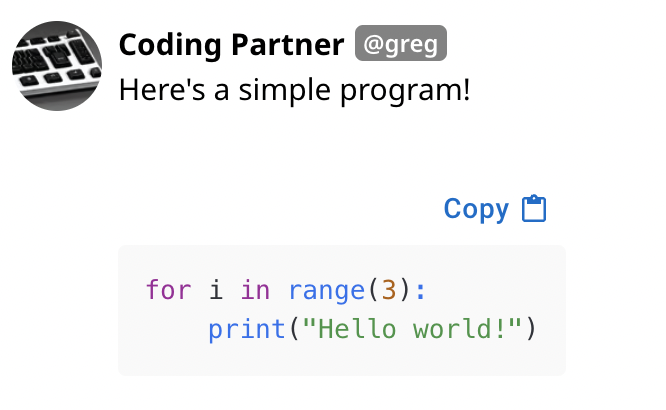
You can also create multi-line code blocks using three backticks \`\`\` or three tildes \~\~\~ around the content.&#x20;

<div><figure><img src="https://1892234324-files.gitbook.io/~/files/v0/b/gitbook-x-prod.appspot.com/o/spaces%2FEPKaFCA0X9sMHG2M4S79%2Fuploads%2FvFbfL95WIJWeXyj2jeHb%2Fimage.png?alt=media&#x26;token=67adc33f-b97c-4d90-a39c-b6426ab6790b" alt=""><figcaption></figcaption></figure> <figure><img src="https://1892234324-files.gitbook.io/~/files/v0/b/gitbook-x-prod.appspot.com/o/spaces%2FEPKaFCA0X9sMHG2M4S79%2Fuploads%2FySrK5mFIj2S4Jzmr624q%2Fimage.png?alt=media&#x26;token=c30276f8-c90e-48c4-b113-7258e9c32ec7" alt=""><figcaption></figcaption></figure></div>


---

# Agent Instructions: Querying This Documentation

If you need additional information that is not directly available in this page, you can query the documentation dynamically by asking a question.

Perform an HTTP GET request on the current page URL with the `ask` query parameter:

```
GET https://book.character.ai/character-guide/advanced-creation/beyond-plain-text/markdown-styling.md?ask=<question>
```

The question should be specific, self-contained, and written in natural language.
The response will contain a direct answer to the question and relevant excerpts and sources from the documentation.

Use this mechanism when the answer is not explicitly present in the current page, you need clarification or additional context, or you want to retrieve related documentation sections.